🔔 āļ›āļĢāļ°āļāļēāļĻāļŠāļģāļ„āļąāļ: āļ­āļąāļ›āđ€āļ”āļ•āļŠāļ·āđˆāļ­āļœāļđāđ‰āļĢāļąāļšāđ€āļ‡āļīāļ™āđƒāļŦāļĄāđˆ āļāļĢāļļāļ“āļēāļ•āļĢāļ§āļˆāļŠāļ­āļšāļāđˆāļ­āļ™āļŠāļģāļĢāļ°āđ€āļ‡āļīāļ™ āļ­āđˆāļēāļ™āļĢāļēāļĒāļĨāļ°āđ€āļ­āļĩāļĒāļ” â†’
075-845-490 | 097-165-2449
LINE OA: @hostnakhonitech (āļŠāđˆāļ­āļ‡āļ—āļēāļ‡āļŦāļĨāļąāļ)
🎉 āđ‚āļ›āļĢāđ‚āļĄāļŠāļąāđˆāļ™āļžāļīāđ€āļĻāļĐ! āļĨāļ” 10% āļŠāļģāļŦāļĢāļąāļšāļĨāļđāļāļ„āđ‰āļēāđƒāļŦāļĄāđˆ

CentOS / RHEL 7 : How to reinstall GRUB2 from rescue mode Print

  • 1

Booting into rescue mode and reinstalling GRUB2

1. Boot from the RHEL7 installation DVD by altering the boot order in Bios and selecting DVD media as the first booting preference.

Note : Older version of RHEL 7 DVD will not work here. So make sure you have latest version RHEL 7 DVD with you.

2. At the boot screen, Select the Troubleshooting option at the end of the screen.
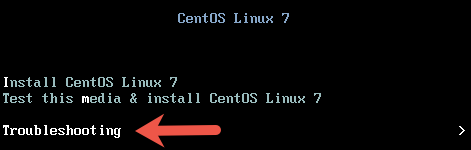
 

troubleshooting option for RHEL 7 rescue mode

3. At the next screen, select the option Rescue a CentOS Linux system.
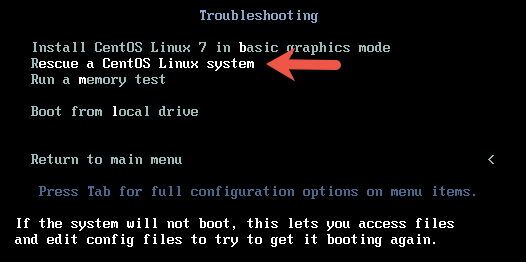
rescue a centos 7 system reinstall GRUB2

4. On the next screen, press enter to continue. When asked if you would like Rescue to find your installation, choose Continue.
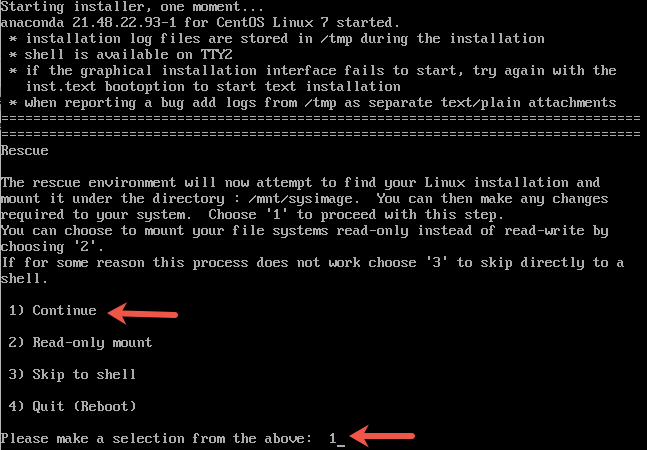
find linux installation for rescue mode RHEL 7 reinstall GRUB2

If you run into trouble detecting your install, retry using the Skip option and manually detect and mount your storage. You would get a message shown in the picture below if the rescue mode has detected the correct installation.
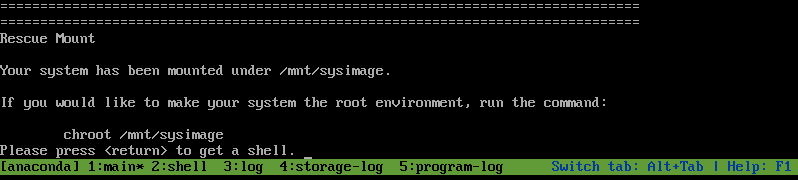
system has been mounted under :mnt:sysimage RHEL 7 reinstall GRUB2

5. Next step is to change your root directory to /mnt/sysimage using the chroot command. This makes your system the root environment.

# chroot /mnt/sysimage

6. Use the grub2-install command to re-write the MBR to your boot device. The boot device is usually /dev/sda.

# grub2-install /dev/sda

You should get a successful installation message as shown below.

grub2-install RHEL 7

To reboot the system first exit from the chroot environment and the run reboot command.

Reinstalling grub2 on UEFI-based machines

If you are on an UEFI-based machine, make sure you add the below 2 steps as well before you re-install GRUB2 using “grub2-install” command.

1. If the EFI System Partition has been recreated or damaged, these files can be recovered by reinstalling the grub2-efi, grub2-efi-modules and shim packages.

# yum reinstall grub2-efi grub2-efi-modules  shim

2. If /boot/efi/EFI/redhat/grub.cfg has been removed or damaged, it can be restored with the following command:

# grub2-mkconfig -o /boot/efi/EFI/redhat/grub.cfg


Was this answer helpful?

Related Articles

āļ§āļīāļ˜āļĩāđ€āļ›āļĨāļĩāđˆāļĒāļ™ hostname āļšāļ™ CentOS 7 āđāļĨāļ° RHEL 7 āļ”āđ‰āļ§āļĒ hostnamectl āđ‚āļ”āļĒāļāļēāļĢāđƒāļŠāđ‰āļ„āļģāļŠāļąāđˆāļ‡ hostnamectl āļāļēāļĢāđƒāļŠāđ‰āļ‡āļēāļ™āļ„āļģāļŠāļąāđˆāļ‡āļ™āļĩāđ‰āļāđ‡āļ‡āđˆāļēāļĒāļĄāļēāļ āļ–āđ‰āļēāļ•āđ‰āļ­āļ‡āļāļēāļĢāļ”āļđ hostname āļāđ‡āđƒāļŠāđ‰āļ„āļģāļŠāļąāđˆāļ‡... āļ§āļīāļ˜āļĩāđ€āļ›āļĨāļĩāđˆāļĒāļ™ hostname āļšāļ™ CentOS 7 āđāļĨāļ° RHEL 7 nmtui command You can set host name using nmtui command which has text user interface for new users: # nmtui... āļ§āļīāļ˜āļĩāđ€āļ›āļĨāļĩāđˆāļĒāļ™ HostName āđƒāļ™ RHEL āđāļĨāļ° CentOS 6.X āļāđˆāļ­āļ™āđ€āļ›āļĨāļĩāđˆāļĒāļ™āđāļ›āļĨāļ‡āđāļ™āļ°āļ™āļģāđƒāļŦāđ‰āļ•āļĢāļ§āļˆāļŠāļ­āļšāļŠāļ–āļēāļ™āļ° hostname āļ›āļąāļˆāļˆāļļāļšāļąāļ™āļāđˆāļ­āļ™āļ„āļĢāļąāļšāļ”āđ‰āļ§āļĒāļ„āļģāļŠāļąāđˆāļ‡ hostname  ... āļ§āļīāļ˜āļĩāđāļāđ‰ IP āļšāļ™āđ€āļ‹āļīāļĢāđŒāļŸāđ€āļ§āļ­āļĢāđŒ RHEL / CentOS 7 āļ”āđ‰āļ§āļĒ nmtui nmtui (Network Manager Text user interface) is a command line program available in RHEL/CentOS 7... āļ§āļīāļ˜āļĩ āļ•āļąāđ‰āļ‡āļ„āđˆāļē TUI Firewall CentOS 7 āđāļĨāļ° RHEL 7 To setup TUI Firewall settings in CentOS 7, follow the steps below:-   First go to...
« Back